



Reliable and adaptable healthcare systems - with NServiceBus
NServiceBus is a .NET messaging framework from Particular Software for building healthcare systems that don't lose data. Every request, such as a lab result or an insurance claim, is sent as a message and stored in a durable queue.
If a server crashes or a partner system goes down, the message waits in the queue and gets retried. Business rules live in their own message handlers, so when a regulation changes, you update the handler and leave the rest of the system alone. Instead of waiting for nightly batch files, records from external systems arrive immediately as individual messages. With ServicePulse, any message that fails is shown so you can fix the problem and replay it.
Healthcare systems need to be reliable and robust. After all, lives could be on the line. But they also need to navigate an increasingly complex landscape of regulations and integrations. New approaches to system architecture are needed to deal with those challenges.
Building a system with NServiceBus and the Particular Service Platform will let you:
- Protect mission-critical data by building a system with reliability baked in.
- Reduce the stress of changing regulations with an architecture designed to manage complexity.
- Integrate easily with multiple external systems.
- React quickly when something goes wrong.
Keep patient data safe in a distributed system
NServiceBus stores each request as a message in a durable queue. If a server crashes, a database deadlocks, or a partner system goes down, the message waits in the queue and gets retried, so the data isn't lost.
When you’re dealing with patient outcomes, reliability is extremely important. Even when not dealing directly with people’s lives, healthcare systems typically involve lots of money or lots of liability.
In none of those situations do you want to say "We lost the data."
Distributed systems built on HTTP using RPC communication (e.g., REST) are inherently at risk of losing data. If the HTTP call fails, or if a database has a deadlock, the data is gone.
Even worse, what if an unreliable network causes an HTTP request timeout? Did the server successfully process the request, but then time out while sending the response? Did the server never receive the request in the first place? There’s no way to know.
In a healthcare system built with NServiceBus, your data is recorded immediately to a message in a queue, where it is safe. If anything fails while it is being processed—if a server crashes, if the database is down, or if a third-party service fails—the message goes back to the message queue and waits to be processed again.
When your data is kept safe, it can save money, prevent lawsuits, or maybe even save lives.
Watch this video for a better picture of how failures can lead to losing patient data or other critical healthcare data, and how using NServiceBus will keep that data safe.
Adapt to changing healthcare regulations without a rewrite
With NServiceBus, business rules live in their own message handlers that communicate through published events. When a regulation changes, you update or add one handler instead of untangling a large, tightly coupled codebase.
Healthcare may be one of the most regulated industries in existence, and with good reason. Concerns around patient safety and privacy must always be held as paramount.
Even so, keeping up with an always-changing regulatory environment can be complex to manage. Maintaining compliance with regulations such as HIPAA and ISO 27799 involves careful cooperation with lawyers and frequent code changes to turn written regulations into actionable software policies.
Large codebases based on complex business requirements tend to evolve over time to be highly coupled. What might be maintainable on a smaller scale becomes more and more unwieldy as the codebase grows. Small code changes have the capacity to break other parts of the system until we are spending more time testing these changes than delivering new features.
Designing a system with NServiceBus means using asynchronous messaging and the publish/subscribe pattern to keep coupling in the system to a minimum:
- Every meaningful business state is an event, so new functionality can often be added just by adding a subscriber to an existing event.
- Each message handler concerns itself with only one simple business decision, and any consequences of that decision are communicated using additional messages.
- When something is wrong with a handler, the problem is localized and easily diagnosed—you don’t need to spelunk through hundreds of lines of heavily coupled business logic.
- As the regulatory environment changes, you can evolve the system without rewriting large sections of the application.
In short, NServiceBus forces you to write better code that will be easier to maintain and extend in the long term. You can read more about this in our blog post Empires fall: Decentralize your code to avoid total collapse.
The publishing events lesson of the NServiceBus step-by-step tutorial shows how to define an event, publish it, and add subscribers that react to it.
Integrate healthcare systems without fragile batch jobs
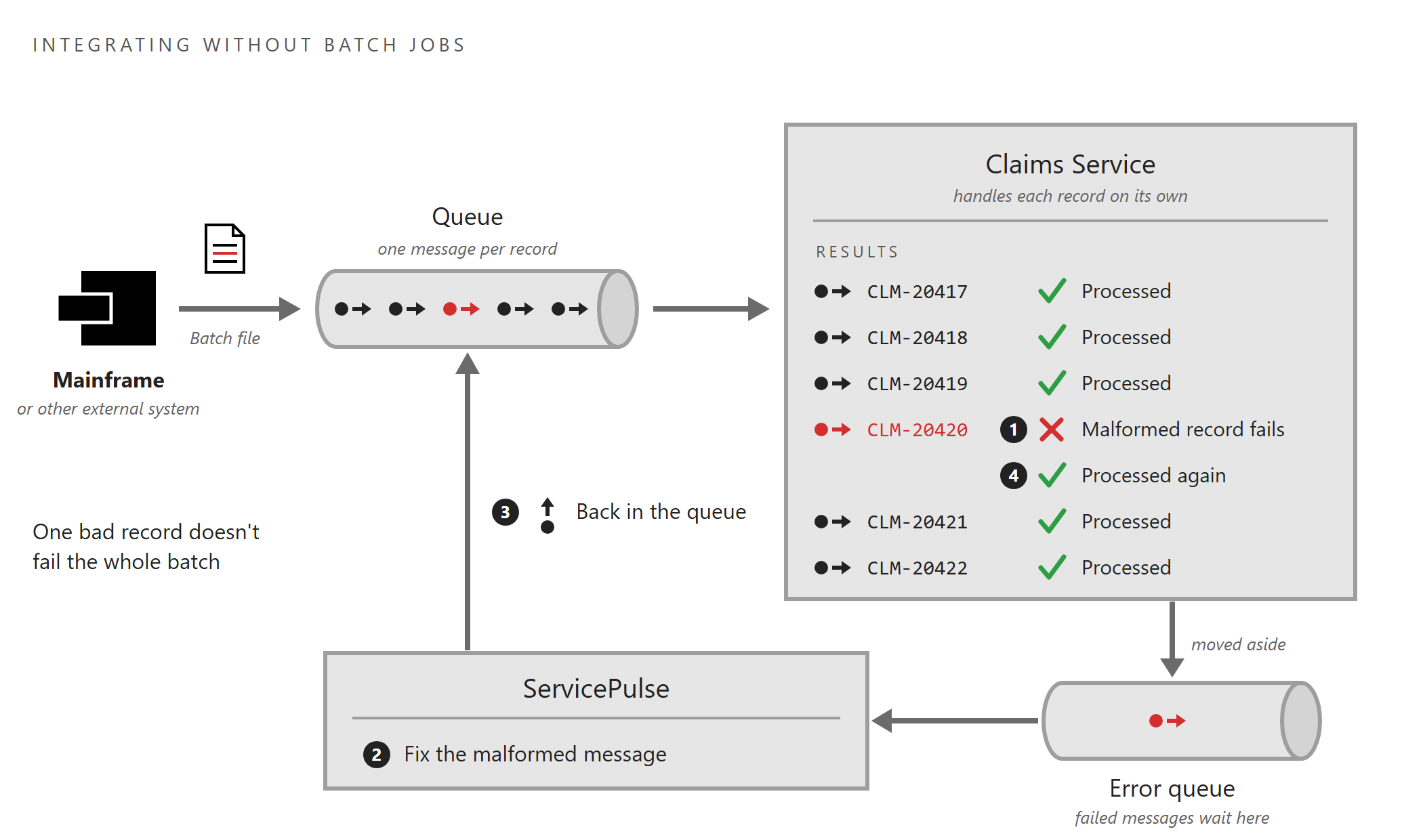
NServiceBus turns each record from an external system into its own message. When one record is malformed, only that message fails. Instead of rerunning the whole batch, you can fix the message and send it again from ServicePulse.
In healthcare, systems rarely operate in a vacuum. Often, your software system will need to pull data from, send data to, or sync data with other systems.
Developers in the healthcare industry also know that the mainframe, far from being a relic of an age gone by, is still alive and well, and we need to talk to these systems as well. Often, this integration happens with batch jobs, which are prone to failure in the middle of the night, “somewhere” in the middle.
How do you recover from failed batch jobs? Usually, quite painfully. You’ve got to dig into the logs, figure out exactly how many thousands of records got processed successfully, the one where it failed, and then how to restart the job at exactly the right place to avoid thousands of duplicates.
In an NServiceBus system, that’s not a problem, because you don’t need batch jobs for integration anymore. When you turn each record into an individual message, only the one problematic record fails, and is moved aside to an error queue. You can see the exception and even fix the malformed message directly in ServicePulse and then just put it back in the queue to process again.
React quickly when something goes wrong
ServicePulse shows every failed message in one place, with the stack trace and the data that caused it. Once the underlying issue is fixed, you can replay all the failed messages in one group, often before users notice anything went wrong.
Errors are inevitable. But when they occur, they need to be diagnosed and fixed quickly. The stakes might be an expensive drug trial, or even someone’s life.
When you use NServiceBus you also get the Particular Service Platform, which includes our message monitoring tools that make it easy to see when errors have occurred.
In ServicePulse, you can:
- See all failed messages, grouped by message type and exception.
- See the stack trace without having to hunt through log files.
- See the message body (i.e., the data) that led to the exception in the first place.
- Once the fix is in place, replay all of the failed messages of the same type—there could be dozens or hundreds—in one batch. Many times, end users don’t even have to know there was ever a problem.
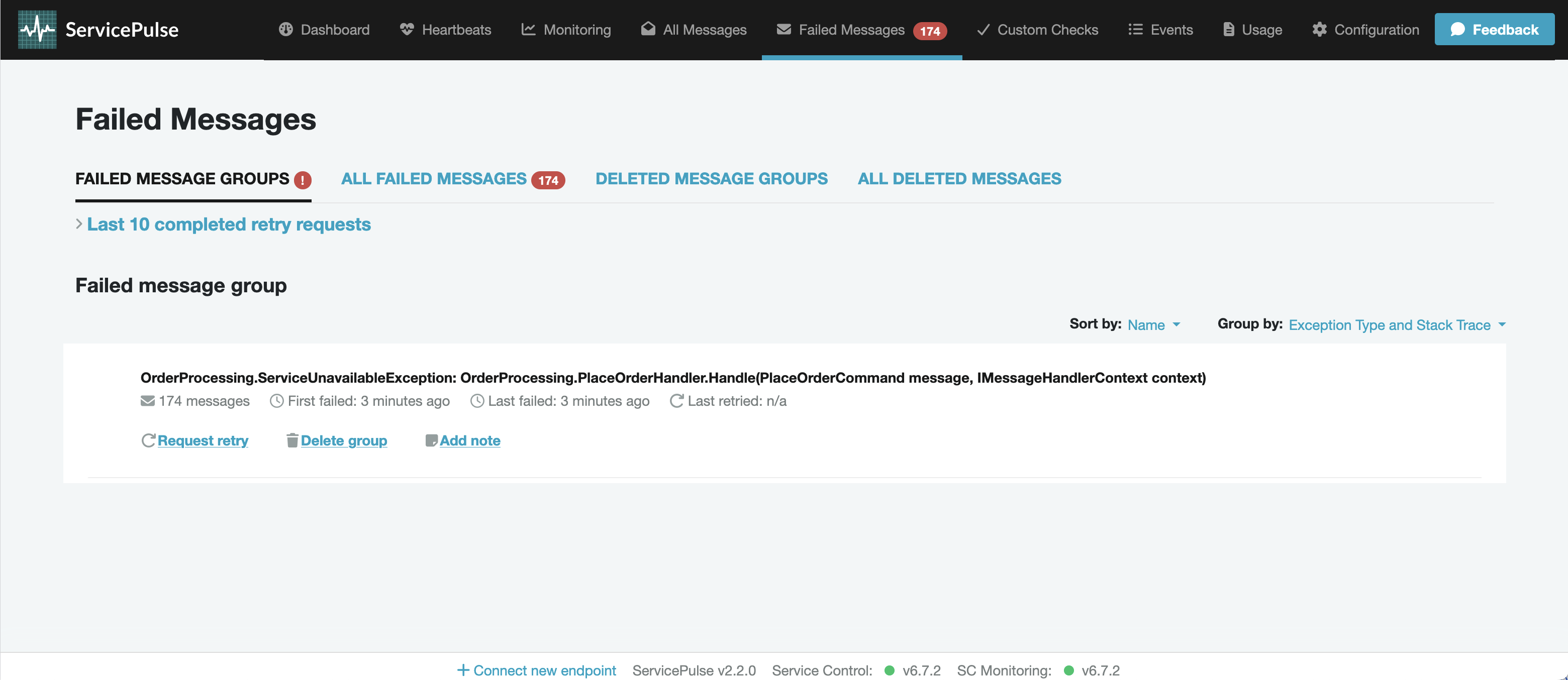
A Particular-based system even maintains an audit trail of every message successfully processed. In more complex failure scenarios you can visualize your system using diagrams generated from audit data. This allows you to gain the high-level overview that makes it easier to diagnose complex problems.
The message replay tutorial walks through finding a failed message in ServicePulse and sending it back to be processed again.