


Modern NServiceBus messaging on IBM MQ

Have you ever used a green screen application backed by an IBM mainframe? Or watched a store clerk try to navigate a green-screen point-of-sale system? One of us authors (we’ll never admit who!) remembers almost taking down an entire call center on one of those systems, but that’s another story. 1
Those apps and systems are about as far away from “modern” as you can get, but they run real business: they move orders, settle payments, and sync inventory. Companies that can’t afford downtime depend on them all day, every day. They carry decades of business rules that are hard to replace and risky to rewrite. So most teams don’t get the luxury of choosing between “old” and “new.” They’re trying to keep mission-critical systems in place while giving developers a better way to build with and around them.
Our new IBM MQ message transport bridges the old and the new. IBM MQ keeps doing what it’s always done well: durable, reliable message delivery. NServiceBus adds a modern programming model and operational tooling that many teams would otherwise have to build by hand: handlers instead of receive loops, built-in recoverability, and visibility across service boundaries.
🔗NServiceBus in IBM MQ terms
IBM MQ handles the hard part: moving bytes, persistence, ordering, and a well-understood security model that enterprises have trusted for decades. NServiceBus handles everything developers usually end up reinventing on top of that.
Think of the split this way. IBM MQ moves bytes reliably between queues and topics. NServiceBus handles what your application code does with those bytes, and makes that behavior consistent across every service in your system.
Instead of writing MQGET loops, managing connection state, and reasoning about backout logic yourself, you implement a handler. You describe which message types your service cares about, write the business logic, and the framework handles the receive loop, deserialization, retries, and error routing.
A few concepts map directly:
- A queue maps to an NServiceBus endpoint. Each endpoint has one input queue that NServiceBus can create and manage.
- A
MQGETloop becomes anIHandleMessages<T>handler. NServiceBus handles the receive loop, connections, deserialization, retries, and error routing. BackoutCountand dead-letter queues map to automatic retries and an error queue. After the configured attempts fail, the message lands in the error queue with full context for inspection and replay.- Syncpoint maps to atomic receive + send. Receiving a message and sending new ones happens in a single commit or rollback, matching MQ syncpoint behavior.
- Topics with durable subscriptions become publish/subscribe over C# types. Subscriptions and bindings are created automatically with no manual topic wiring needed.
Beyond the framework itself, the Particular Platform includes operational tooling that IBM MQ teams will find directly relevant. ServicePulse is the operations dashboard for monitoring, diagnosing, and replaying failed messages, individually or in bulk, across your entire system.
NServiceBus handles what happens inside a service. The Particular Platform gives you the operational insight across all of them.
🔗Retries and failed message handling
When message processing logic fails for any reason, NServiceBus recoverability features ensure no message gets lost, while our ServicePulse tool’s recoverability and debugging features make sure you can diagnose, fix, and retry those failures easily.
Message handlers don’t have to worry about a message’s BackoutCount. NServiceBus manages that for you, applying both immediate and delayed retries before moving the message aside to an error queue to prevent other messages from being blocked.
In ServicePulse, you can view a failed message’s payload and error details, and decide what to do with it, either individually or in bulk. It can also show relationships to other messages: what triggered what, and in what order. When a production issue spans multiple services, this tool makes sense of a sea of disconnected events.
You don’t have to build management tooling yourself; NServiceBus already covers it. To learn more about these capabilities, check out the blog post I caught an exception. Now what? or download a demo from the Retry failed messages using ServicePulse sample.
🔗Publish/Subscribe topology
The transport implements pub/sub using IBM MQ’s native topic and subscription infrastructure. You won’t need to manually configure topics because NServiceBus creates a topic topology based on event types.
In NServiceBus, an event is a C# type that implements IEvent.
// Shared contract assembly
public record OrderPlaced(Guid OrderId, string Product) : IEvent;
Publishing is a single call on the message session:
await session.Publish(new OrderPlaced(orderId, "Widget"));
Subscribing requires no registration call. Any endpoint with a handler for the type will receive it:
sealed class OrderPlacedHandler : IHandleMessages<OrderPlaced>
{
    public Task Handle(OrderPlaced message, IMessageHandlerContext context)
    {
        Console.WriteLine($"Order {message.OrderId} placed for {message.Product}");
        return Task.CompletedTask;
    }
}
Behind those three pieces of code, NServiceBus is doing the following IBM MQ work:
- On the publisher side, it creates a topic object for
OrderPlaced(for exampleDEV.MYAPP.EVENTS.ORDERPLACED, mapping to topic stringdev/myapp.events.orderplaced/). - When
Publishis called, we publish the message to the topic string via thePutToTopicapi. - On the subscriber side, it creates a durable subscription named
Shipping:dev/myapp.events.orderplaced/, linking the topic string to theShippinginput queue. - IBM MQ delivers a copy of every published message to that queue automatically.
🔗Automating topology setup
One challenge with IBM MQ systems is correctly creating infrastructure with runmqsc scripts. With NServiceBus, you won’t need to author these by hand if you don’t want to.
NServiceBus can generate queues, topics, and subscriptions automatically at runtime. Still, in production deployments, you may want to use DevOps patterns to define the infrastructure with different credentials than the applications should have at runtime. For that, you can use the ibmmq-transport tool that ships with the transport.
A hand-written runmqsc script might look like this:
* Create the input queue
DEFINE QLOCAL(SHIPPING) MAXDEPTH(5000) DEFPSIST(YES)

* Create the topic object
DEFINE TOPIC(PROD.MYCOMPANY.EVENTS.ORDERPLACED) +
    TOPICSTR('prod/mycompany.events.orderplaced/')

* Create the durable subscription
DEFINE SUB('Shipping:prod/mycompany.events.orderplaced/') +
    TOPICOBJ(PROD.MYCOMPANY.EVENTS.ORDERPLACED) +
    DEST(SHIPPING) +
    DURABLE(YES)
But that requires you to get queue names, topic names, and other settings exactly right…and then you must repeat it for every endpoint, every event, and every environment.
With the ibmmq-transport tool, you move up a level of abstraction. Instead of directly describing queues, topics, and subscriptions that must agree based on some unseen rules, you define endpoints and subscribe events to them. The tool handles the necessary details.
# Create the input queue for an endpoint
ibmmq-transport endpoint create Shipping \
    --host mq-server.example.com \
    --queue-manager QM1

# Subscribe it to an event - creates the topic object and durable subscription
ibmmq-transport endpoint subscribe Shipping \
    "MyCompany.Events.OrderPlaced" \
    --topic-prefix PROD \
    --host mq-server.example.com \
    --queue-manager QM1
The CLI knows the naming conventions and creates all the necessary objects for you. Connection details are stored in environment variables, so the commands stay short and easy to read.
🔗Transactions
In traditional IBM MQ development, there’s no built-in way to ensure message processing is idempotent or to prevent ghost messages or zombie records. 2 Basically, you can’t guarantee that a database update and a message send operation will be atomic.
NServiceBus closes that gap with the Outbox. When enabled, it stores outgoing messages in the same database transaction as the business data. After the transaction commits, NServiceBus dispatches the messages. If the process crashes before dispatch, the messages are still in the database and will be sent on the next attempt. If the incoming message is redelivered, it detects the duplicate, and the handler does not run again.
As a result, messages don’t escape without their corresponding database updates, and data updates don’t happen without sending corresponding messages.
🔗Observability
The native IBM MQ client provides limited application-level observability. If you want visibility into latency, failure rates, or message flow across services, you’ll need to build it yourself.
NServiceBus provides built-in OpenTelemetry (OTel) support across tracing, metrics, and logging using OTel messaging semantic conventions. The transport emits spans for Receive, Dispatch, PutToQueue, PutToTopic, and Attempt (which wraps the immediate retry loop), and records transaction outcomes as events: mq.commit on success, mq.backout when a message goes back on the queue. That data flows into whatever backend your team already uses or plans to use (Application Insights, Jaeger, Prometheus, Zipkin, Grafana, Datadog, etc.) without any custom instrumentation.
🔗Mainframe integration
IBM MQ and mainframes go hand in hand. They’ve been part of the same enterprise stack for decades, and that’s not changing any time soon. What has changed is how much easier NServiceBus makes it to work with data coming from those systems.
The NServiceBus pipeline gives you a clean place to handle the messy parts of mainframe integration. Fixed-length records, EBCDIC encoding, and proprietary formats are concerns you can handle separately from your business logic, keeping your codebase more understandable. Deserialization lives in one place, message contracts live in another, and your handlers work with typed .NET objects. The mainframe complexity doesn’t bleed into the rest of the code.
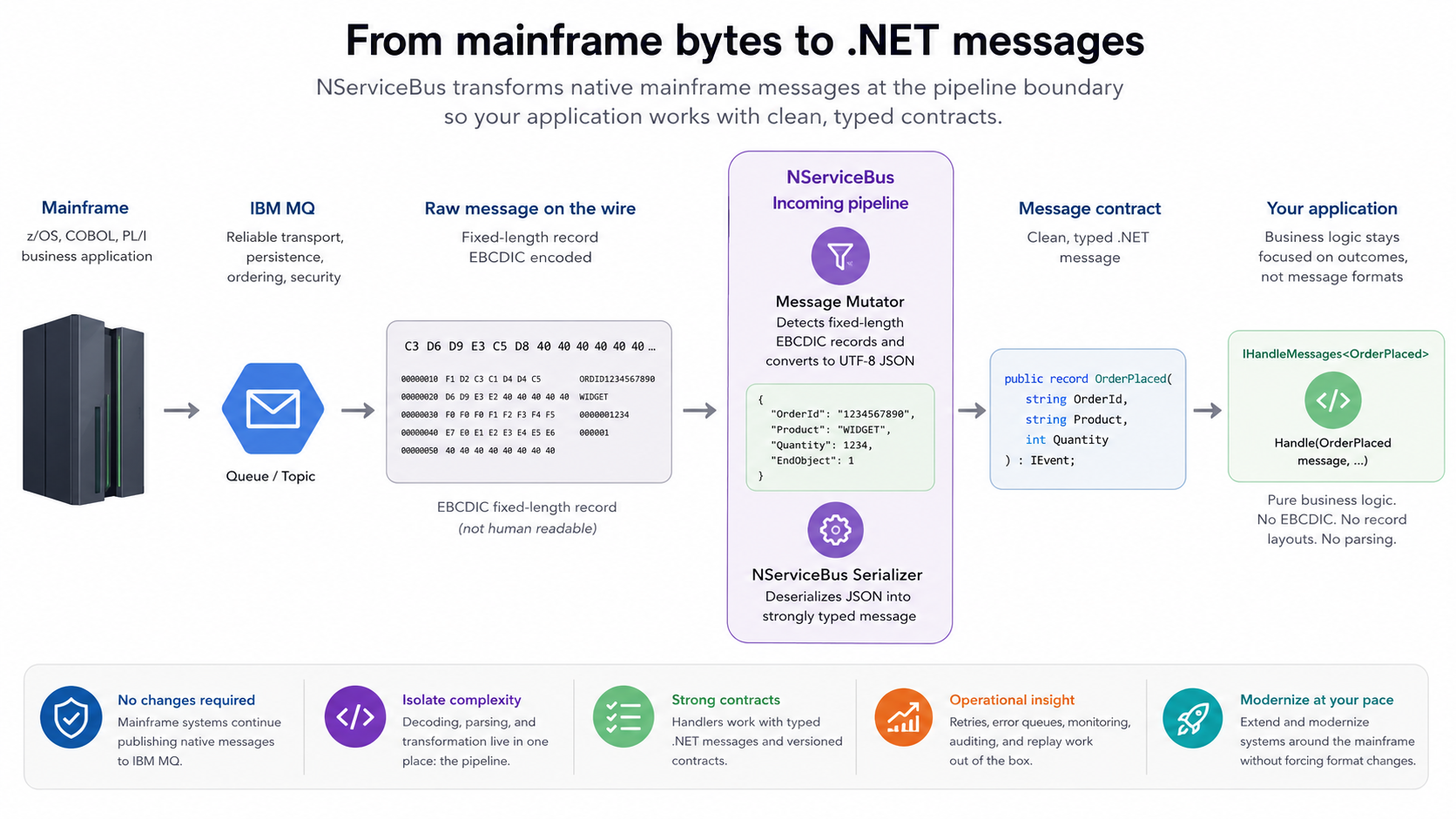
See our blog post Infrastructure soup for more on how the NServiceBus pipeline can handle cross-cutting concerns.
🔗From IBM MQ to the cloud, one endpoint at a time
IBM MQ doesn’t exist in isolation. Many organizations running it on-premises also run cloud workloads on Azure Service Bus or Amazon SQS, or work with partners on RabbitMQ. Normally, connecting these environments means custom integration code, duplicated messaging logic, or accepting that systems stay isolated.
The NServiceBus Messaging Bridge removes that barrier. It connects two transports transparently. Messages flow between them without either side needing to know the other exists. An endpoint on IBM MQ sends a message, and an endpoint on Azure Service Bus receives it, without polluting your business logic with protocol translation concerns.
This is particularly useful during cloud migrations. You can move endpoints from IBM MQ to a cloud transport one at a time, with the bridge keeping both sides in sync—no high-risk cutover required. You can use the Bridge with any of the transports supported by the Particular Platform.
🔗New to NServiceBus?
The following video shows how NServiceBus can connect to IBM MQ, send a message, and retry persistent failures using the Particular Platform.
If you run IBM MQ and want a simpler programming model with better operational visibility, try NServiceBus. The IBM MQ transport documentation describes connection settings, operational concerns, and links to IBM MQ samples.
We’re genuinely interested in how teams are working with IBM MQ today—share your challenges on the Particular discussion forum. We’re there, we’re actively listening, and we’ll help you figure out if NServiceBus is the right fit.
 Share on Twitter
About the authors



OK fine, you clicked, you asked for it! I was a young, enthusiastic software developer maintaining software that told call center operators which company a caller was trying to reach. My colleagues uploaded files from the command line, but I installed WS_FTP, one of the first FTP clients for Windows (It was great, look it up!) on Windows 3.11 and proudly clicked through the mainframe's folders instead. Then I accidentally dragged one folder into another. Whoops. I had no idea which folder I'd moved, so I did the only natural thing I could do: I told no one. The mainframe slowed and slowed until someone investigated and found the misplaced folder. The machine needed a restart, which took four hours. Calls kept coming in the whole time, but with the software down, operators had to answer the phone without knowing which company they were representing.
For a good primer on these two problems, check out our blog post Banish ghost messages and zombie records from your web tier that describes our transactional session feature that you can also use with the IBM MQ transport.